Sunday, March 28, 2010

2 New Illustrator Drawings

veggie dip illustration


Veggie Dip. Broccoli diving into a bowl of dip.

elephant illustration


Abstract elephant peaking through jungle foliage

Tuesday, March 16, 2010

Abstract Plaster Carving of the Word Arbitrate

Abstract Plaster Carving of the Word Arbitrate


This is the carving about half way through. It started as a large, 3 sided block and then I used a chisel to rough carve out the image from the damp plaster. Pottery tools and sandpaper were used to finish the piece.

Abstract Plaster Carving of the Word Arbitrate


Two of the faces are speaking since when both are talking; they aren’t listening to each other. The third face doesn’t have a mouth, it can only listen and watch.

There is a 4th face that is hidden unless you are looking down at the sculpture. I didn't think anyone but me would spot the 4th face that unites them all but it was caught immediately. I try to put something odd in projects that pleases me but is easily missed.

Wednesday, March 10, 2010

Rube Goldberg Salad Machine Illustrator Drawing

Rube Goldberg Salad Machine Illustrator Drawing
The Illustrator drawing shows how to make a Rube Goldberg style salad. The dressing is poured which causes the tomato to drop on the cracker inside the grapefruit gear. The gear spins, hitting the chicken leg which knocks the radish of the celery stalk. The radish tips over the carrot, knocking the cheese into the bread. The bread tilts, causing the cucumber to roll down the carrot into the salad greens. Simple.

Thursday, March 4, 2010

Bike Gears Drawn In Illustrator

bike gears illustration
I did this illustrator drawing for a class assignment where we were supposed to include a live trace of an image we found on the internet. I chose to utilize the logo from the Minuteman Bikeway.

I tried to find out who designed the logo but there were no artistic credits on the bikeway's site. The bike gear sprocket and chain was based on a photo by Tristan Savatier.

Monday, March 1, 2010

Abstract Rope River Drawn in Illustrator

abstract rope in illustrator


This is an old drawing of mine that I did a live trace of and colored in Illustrator.

Sunday, February 28, 2010

A Few Late Posts From My Art Journal

artist journal page


Hmm.. This is dated Jan 2 but it's actually February. I've been a bit busy lately which might explain how I didn't get the month correct. The scary part is I had 11 cups of coffee that day, 6 of which were expresso.

artist journal page


artist journal page


artist journal page

Tuesday, February 2, 2010

EDM 252 Pine Trees

watercolor painting of pine trees near a lake
Class was canceled so instead of doing something on my very long to do list I did a quick watercolor painting of pine trees near a lake. I'm rather pleased with the mist coming off the lake near the horizon line. We had more snow today so it was rather pleasant to do this from memory.

Abusing a New Watercolor Sketchbook

watercolor painting of mist on a lake


I kept adding washes to my new Cachet Aquafine Watercolor Journal from Daler Rowney to see how far I could push the cold pressed linen paper. I lost track of how many layers I applied before the page started to buckle but it was a lot. I kept that poor paper wet for hours.

Friday, January 29, 2010

EDM 252 Draw Pine Trees - Autumn Trees and Pines

watercolor painting of fall trees
It was -9 degrees when I got up this morning so I went for the oranges and yellows.

It's amazing how warm colors make you feel toasty.

Thursday, January 28, 2010

The Macbook Genie

mac book genie artist journal page
I said to my DH "I wish I didn't have class tonight but Bill never cancels so that's not going to happen."

I opened my computer and there was an email from the college; Shazam, my class was canceled.

I didn't know that Apple had an app that granted wishes.

Wednesday, January 27, 2010

How Did Today Become So Gray?

artist journal drawing of my day


I really didn't plan on today's journal entry to be almost entirely gray.

-I got dressed in gray and black
-put on a black coat
-got in a gray Jeep
-dropped my gray and black clad daughter at school
-went to sculpture class to work on a gray figure
-did a black and white print of penguins jumping off a cliff
-ate takeout from Panda express (I actually dream about orange chicken)
-and worked on a gray MacBook Pro while listening to my gray and black iPod.

Tuesday, January 26, 2010

EDM 258 - Draw the inside of your closet

Artist journal drawing of the inside of my closetThis shelving unit is in the back of my closet, I think of it as the island of misfit clothes and vacation items.

The top has a couple of swim suits that were last used at the gym pool about (cough) months ago.

The cubbies also have various containers for travel use
* unworn belts that don't merit a more prominent location
* sandals that I bought on vacation and discovered that they can not be worn without getting blisters and I can't bear to toss since they were $95
* an amazingly comfy and cute pair of aqua sandals
* red espadrilles
* spring green sandals that always get complements
* more aqua blue shoes
* some overpriced water/hiking shoes that you can supposedly hike in and wear in the water. They dry slowly, give you blisters when wet, and collect little rocks and sand as though they were saving it for a memory jar. I keep hoping if I wear them around the house they will magically become comfortable.

Monday, January 25, 2010

EDM 15 Draw a Tree or Trees - Paper Birch Watercolor

watercolor painting of birch trees

I called these birch trees and my daughter who recently took a Minnesota botany class reminded me they are paper birch trees, betula papyifera. I enjoy knowing the correct names for things and it gives me a chance to use my 9th grade Latin skills.

Actually, all I remember is how to delineate verbs and most of the Latin words for Christmas carols

Sunday, January 24, 2010

Aquatic Visitor

color photo of a frog on a black and white background

I have a fondness for frogs and this gorgeous fellow visited our flower beds last summer. He was the largest frog we've ever hosted, about as large as my fist.

You can find directions for how to add spot of color to a black and white photo using photoshop here.

Saturday, January 23, 2010

Abstract Design Interpretations

I was recently assigned an interesting challenge, take a small portion of 2 different photos, simplify them and recombine them to make a new pattern that could be used in a print. The designs are fun but my favorite part is how different they look depending on how they are rotated.
close up line drawing of an elephant trunk and eye


Elephant and mangrove

fern and silt line drawing


Fern and silt

Hemp rope and a satellite photo line drawing


Hemp rope and a satellite photo

Crumbling wall and flowing water line drawing


Crumbling wall and flowing water

Friday, January 22, 2010

EDM 223 Draw A Favorite Sound - A Running Stream

Watercolor painting of a stream near the base of mountains
I can't think of any sound more soothing than water—the ocean, a brook, rain...

Thursday, January 21, 2010

Snow Shadows

Shadows falling across fresh snow


I like the graphic quality of the shadows across the fresh snow.

Saturday, January 16, 2010

EDM #247 Draw Something Creepy

Ink drawing of a bare tree
When my children were young we hung a tire swing in the backyard from this tree. Alethea loved to spin and would wind the swing and let it go, spinning madly. She was startled when she saw a young girl watching her and by the time she managed to stop, the girl was gone.

Thursday, January 14, 2010

Iceberg For Sale

Ink and marker drawing of an iceberg with a UPC code on it


I was listening to a story about selling icebergs for their water content and was inspired to put a UPC bar code on the side of the ice berg.

Sunday, January 10, 2010

EDM #78 - Draw a Souvenir

Charcoal drawing of an alligator head and vintage fish tank toys


I bought this alligator head at a gas station in Louisiana while on a road trip with my daughters. He's happily menacing an antique fish tank ornament.

EDM #40 Draw Something With Folds

charcoal drawing of a paper bag
Charcoal drawing of a folded, wrinkled paper bag.

Identifying Prismacolor Marker Colors

 Identifying Prismacolor Marker Colors


I enjoy Prismacolor markers but the end caps are frequently not accurate for color. The one of the left has a white color swatch but the color is actually blue. I was becoming tired of testing colors to confirm shades while using the markers so I colored blank return address labels and wrapped them around the cap. No more mystery colors.

EDM #13 Draw Your Telephone

artist journal drawing of a telephone


I've had a cell phone for well over a decade but it seems longer. When I got my first cell phone my DH thought it was silly to carry a phone, he got one of his own a few days later. I photoshoped out my current cell phone number.

The tropical scene is the phone's wallpaper.

Saturday, January 9, 2010

Wednesday, January 6, 2010

Purple Rose Zentangle

Purple Rose Zentangle
I was thinking about the movie the Purple Rose of Cairo; I always meant to see it since I like the name but this is the closest I've come.

How To Make A Text Clipping Mask In Photoshop

How To Make A Text Clipping Mask In Photoshop


Open your background image; this will be what you see inside the text.

command j to duplicate the layer

type your text in a new layer

move the background duplicate layer over the top of the text layer, the text will disappear.

turn off the original background layer

Place your mouse cursor between the background layer and the text layer in the layers palette. Option click (the appearance of the cursor will change)

How To Make A Text Clipping Mask In Photoshop


You'll see a change in the background copy thumbnail indicating the clipping mask.

You can press the v key to activate the move tool and shift the text over the image so that you can find the best placement for the visible image in your text.
How To Make A Text Clipping Mask In Photoshop


I put a white background under the text but you can have whatever you want there.

Monday, January 4, 2010

How To Overlay A Photo In Photoshop To Add Texture

How To Overlay A Photo In Photoshop To Add Texture


This is a local lake

How To Overlay A Photo In Photoshop To Add Texture


This is algae on the edge of the same lake. Place this image on a new layer.

How To Overlay A Photo In Photoshop To Add Texture


image->adjustment->desaturate. If you don't desaturate the image the colors will effect the background image

How To Overlay A Photo In Photoshop To Add Texture


You want to bump up the contrast. image->adjustment->levels. Move the sliders under the graph until you are pleased with the image

How To Overlay A Photo In Photoshop To Add Texture


Try different blend modes. I start with overlay and this one is soft light. You can lower the opacity to make the blend more subtle.

Sunday, January 3, 2010

How To Sharpen A Photo In Photoshop Using Overlay

How To Sharpen A Photo In Photoshop Using Overlay


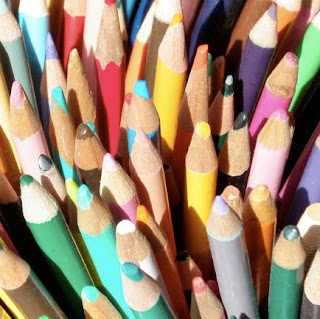
You don't have to use sharpen filters to sharpen a photo. This photo has a small blur and I just want to do a simple sharpen.
How To Sharpen A Photo In Photoshop Using Overlay


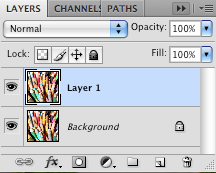
command j to make a new layer

How To Sharpen A Photo In Photoshop Using Overlay


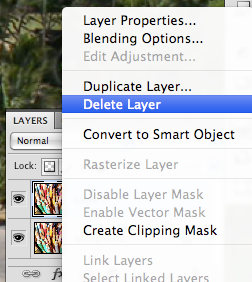
right click on the new layer and click convert to smart object
How To Sharpen A Photo In Photoshop Using Overlay


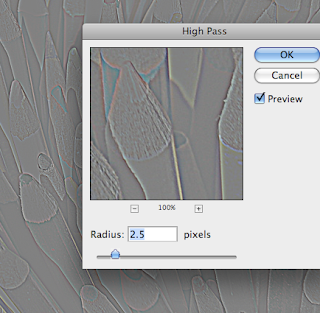
Go to filter->other->high pass

High pass is an edge detection filter; anything not edge becomes 50% grey. I have the radius set to 2.5 as a starting point. Click OK
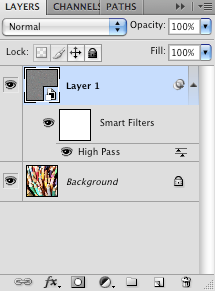
How To Sharpen A Photo In Photoshop Using Overlay


The smart filter has it's own blend mode dialog box. Click on the icon to the right of the word high pass (it looks like a teeter totter)
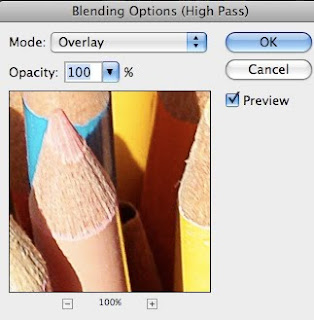
How To Sharpen A Photo In Photoshop Using Overlay


Choose overlay as the blending mode and the grey screen disappears. Click OK.

The nice thing about this being a smart object is if you are not happy with the results you can double click the word high pass and it will bring up te high pass screen and you can readjust the amount from the previous 2.5 pixel radius.
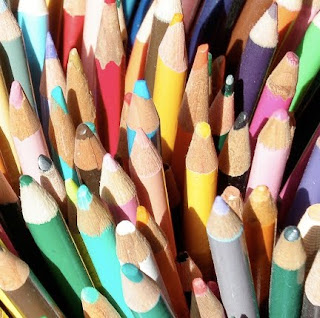
How To Sharpen A Photo In Photoshop Using Overlay


Here are the pencils after sharpening; no pun intended, well maybe...
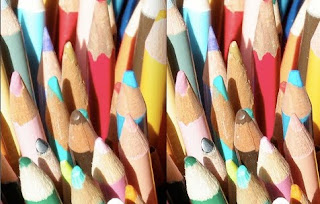
How To Sharpen A Photo In Photoshop Using Overlay


Left is before, right after